Every complete list of HTTP status codes on the internet was written by developers, for developers. They will tell you that 413 means Content Too Large and that 226 means IM Used. Not one of them will tell you whether you need to care.
That is the gap this article fills. There are 64 registered status codes. I have listed all of them, and I have given every single one a verdict.
The short answer, before the long one, is that you will meet about a dozen of these in your working life. But a handful will quietly remove pages from Google without telling you, and one of them is genuinely dangerous if you leave it running. It is not the one most people worry about.
The Short Version
- A 200 means the page loaded and Google can consider indexing it. This is the one you want.
- A 301 permanently moves a page and takes its ranking signals with it. A 302 does not.
- A 404 is normal. Google has said outright that it is not a negative quality signal, so stop panicking about the Search Console report.
- A 503 is the only code worth configuring before you need it, because a botched maintenance window is a genuine risk.
- A soft 404 is not a real status code, which is exactly what makes it the one that costs people pages.
- Four codes deserve real attention on a normal small business website. The other 60 are either working correctly or are not your problem.
How a Status Code Actually Works
Every time a browser or a search engine asks your website for a page, your server answers twice. First it sends a three digit number, then it sends the page. The number arrives first and it explains what is about to follow.
The number is the status code. It is invisible in normal use. You only ever see one when something has gone wrong badly enough that your browser gives up and shows you the number instead of a page, which is why most people associate status codes exclusively with errors. In reality, every successful page view you have ever had came with a status code attached. It just happened to be a 200, and 200 means “here is the page, as requested”.
This matters for search because Googlebot reads that number before it reads a word of your content, and it acts on the number. A code can tell Google to index a page, to move its rankings somewhere else, to forget the page exists, or to come back later and try again. Get the number wrong and it does not matter how good the page is.
The codes are grouped into five ranges, and the first digit tells you everything about the category.
| Range | Category | What It Means | Your Concern Level |
|---|
| 1xx | Informational | Hold on, I am still working | None |
| 2xx | Success | Here is what you asked for | None, this is the goal |
| 3xx | Redirection | It is somewhere else now | High, this is where rankings move |
| 4xx | Client Error | You asked for something I cannot give you | Medium, mostly harmless but check |
| 5xx | Server Error | I broke | High, especially if it lasts |
The Complete Reference
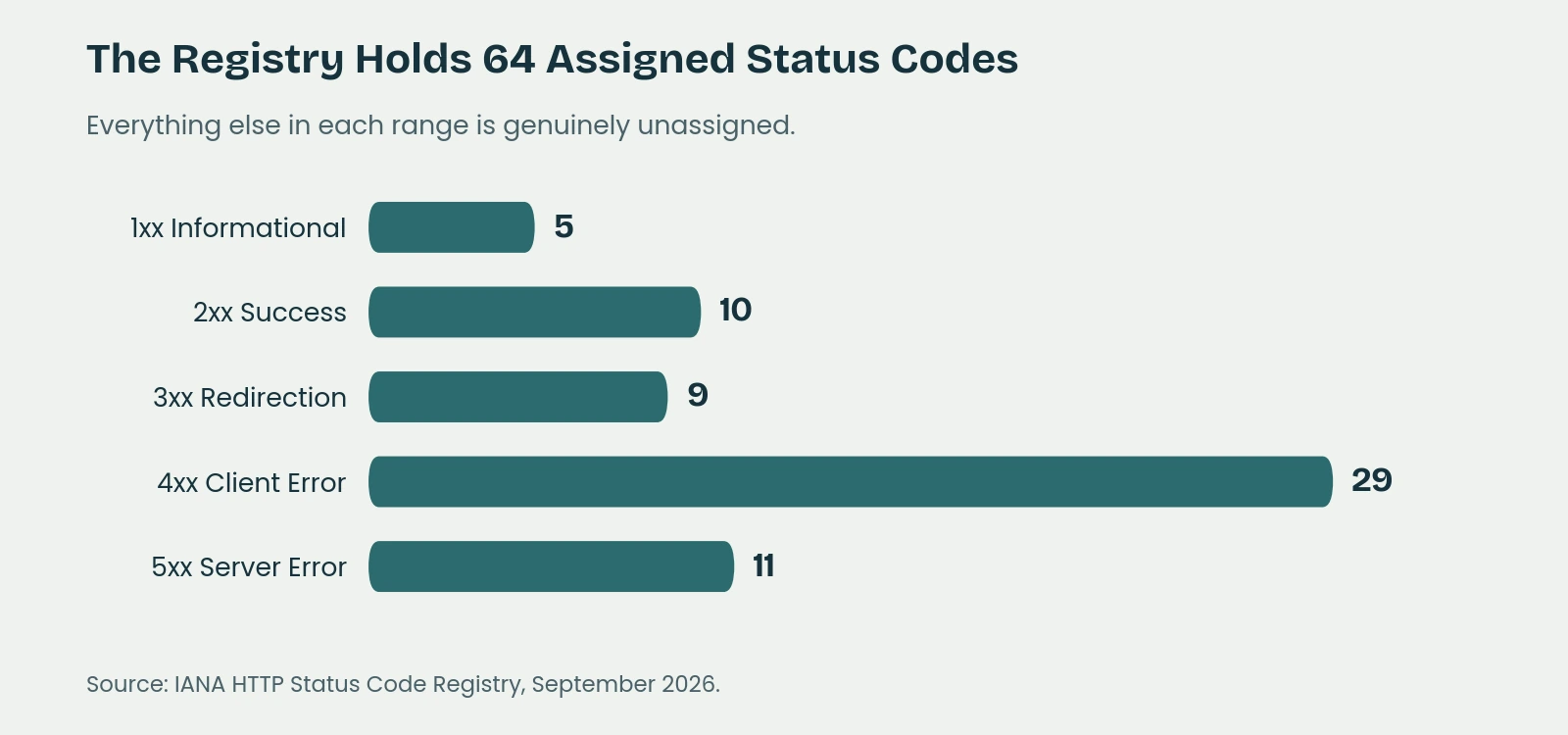
Here is the whole registry. The authoritative list is maintained by IANA, and it currently holds 64 assigned codes. Everything not listed below is genuinely unassigned, which is a detail most articles skip because they copied their list from another article rather than from the source.
I have added the two columns nobody else includes.
The 4xx range holds almost half the registry on its own. You will realistically meet four of them. Source: IANA HTTP Status Code Registry, September 2026.
1xx Informational
Five codes, and you will never see any of them.
| Code | Name | Plain English | What Google Does | Act? |
|---|
| 100 | Continue | Carry on, I am ready for the rest | Nothing | No |
| 101 | Switching Protocols | Changing how the browser and server talk | Nothing | No |
| 102 | Processing | Still working on it | Nothing | No |
| 103 | Early Hints | Start loading these resources now | Nothing directly, but users benefit | Worth knowing |
| 104 | Upload Resumption Supported | You can resume an interrupted upload | Nothing | No |
The only one here that deserves a second look is 103 Early Hints. It lets your server tell the browser to start fetching your stylesheet and fonts while the page itself is still being assembled. It is a real performance feature with real support, and performance does affect search. You will not configure it by hand, but if your host offers it, take it.
2xx Success
Ten codes. One of them you depend on, two of them are traps.
| Code | Name | Plain English | What Google Does | Act? |
|---|
| 200 | OK | Here is the page | Considers it for indexing | No, this is correct |
| 201 | Created | I made the thing you asked for | Waits briefly, then processes | No |
| 202 | Accepted | I will make it shortly | Waits briefly, then processes | No |
| 203 | Non-Authoritative Information | Here it is, but it passed through a proxy | Processes it | No |
| 204 | No Content | Success, but there is nothing to show you | Cannot process, nothing received | Yes, if unintended |
| 205 | Reset Content | Success, now clear the form | Nothing useful | No |
| 206 | Partial Content | Here is the chunk you asked for | Handles media ranges | No |
| 207 | Multi-Status | Several answers at once | Nothing | No |
| 208 | Already Reported | I told you about this already | Nothing | No |
| 226 | IM Used | Here is the difference, not the whole file | Nothing | No |
The trap in this range is not really a code at all. A 200 is a promise that a real page follows. If your server returns a 200 and then shows a page reading “Sorry, nothing found”, you have broken that promise, and Google notices. That is the soft 404 problem, and it gets its own section further down because it causes more quiet damage than anything else on this list.
The other one to watch is 204 No Content. It is correct behaviour for a form submission that has nothing to display afterwards. It is a problem if a real page starts returning one, because Google receives nothing and has nothing to index.
3xx Redirection
Nine codes, and this is where your rankings actually move.
| Code | Name | Plain English | What Google Does | Act? |
|---|
| 300 | Multiple Choices | Several versions exist, pick one | Rarely used, little effect | No |
| 301 | Moved Permanently | It has moved, for good | Strong signal, moves ranking signals | Use deliberately |
| 302 | Found | It is elsewhere temporarily | Weak signal, keeps the original | Check it is intended |
| 303 | See Other | Look over here instead | Signals the indexing system | No |
| 304 | Not Modified | Nothing has changed since last time | Saves crawl effort, good thing | No |
| 305 | Use Proxy | Go through a proxy | Deprecated and ignored | No |
| 306 | (Unused) | Reserved, never implemented | Nothing | No |
| 307 | Temporary Redirect | Temporary, and keep the method | Weak signal | Check it is intended |
| 308 | Permanent Redirect | Permanent, and keep the method | Strong signal, like a 301 | Use deliberately |
Google’s own documentation is unusually blunt about the hierarchy here. Server side redirects are described as having the highest chance of being interpreted correctly. A 301 or a 308 is treated as a strong signal that the destination should become the canonical page. A 302, 303 or 307 is a weak signal, and Google explicitly does not use it to decide that the target should be canonical.
The practical rule fits on a postcard. If the old page is never coming back, use a 301. If it is coming back next week, use a 302. The expensive mistake is using a 302 for a permanent move, because Google keeps treating the old URL as the real one and your new page never quite inherits what it should have. If you are moving a whole site rather than a single page, I have written a separate guide to redesigning without losing your rankings.
One genuinely useful code hides in this range. A 304 Not Modified is your server telling Google that nothing has changed since the last crawl, so there is no point downloading the page again. That is a small efficiency gift on every crawl, and on a large site those add up.
Redirect Chains, Loops and the Ten Hop Limit
Google follows up to ten redirect hops before it gives up. That sounds generous until you see how quickly a real site burns through them. A link points at the old HTTP address, which redirects to HTTPS, which redirects from the non-www version to www, which redirects from an old URL structure to a new one, which redirects a trailing slash. That is five hops and nobody has done anything wrong yet.
Two things go wrong with chains. Each hop is a delay for a real human being waiting on a phone, and every hop is a chance for one link in the chain to break silently. Once the chain exceeds ten, Googlebot treats the end of it as a dead end.
Worse is the loop, where A points to B and B points back to A. The page is not slow, it is gone. Browsers give up and show “too many redirects”, and Google stops trying too. This is not rare. It usually appears after two separate plugins have both been asked to manage redirects and neither knows about the other.
Redirect chains are one of the easiest technical wins available on most sites. Point every redirect at the final destination rather than at the next stop in the chain, and the whole problem disappears.
Meta Refresh and JavaScript Redirects
Neither of these is a status code, which is precisely the point.
A meta refresh redirect is an instruction in the page itself, and Google interprets one set to zero seconds as permanent and anything longer as temporary. A JavaScript redirect only happens once the browser has run your code. Google’s documentation recommends using JavaScript redirects only when a server side redirect is not possible, and describes them as the least reliable option.
Both work. Neither works as well as a number returned by your server before the page even starts loading. If you have the ability to set a proper 301, set a proper 301.
4xx Client Error
Twenty-nine codes, which makes this the largest group by a distance. It is also the group people worry about most and need to worry about least.
| Code | Name | Plain English | What Google Does | Act? |
|---|
| 400 | Bad Request | I cannot understand the request | Drops the URL over time | If on a real page |
| 401 | Unauthorized | You need to log in | Will not index it | No, if intended |
| 402 | Payment Required | Reserved, barely used | Drops the URL | No |
| 403 | Forbidden | You are not allowed in | Will not index it | Yes, check this one |
| 404 | Not Found | That page does not exist | Drops it from the index | Usually no |
| 405 | Method Not Allowed | Wrong type of request | Drops the URL | Rarely |
| 406 | Not Acceptable | I cannot give it to you in that format | Drops the URL | Rarely |
| 407 | Proxy Authentication Required | Log in to the proxy first | Drops the URL | No |
| 408 | Request Timeout | You took too long to ask | Treated as an error | If frequent |
| 409 | Conflict | The request clashes with current state | Drops the URL | Rarely |
| 410 | Gone | It existed, it is permanently gone | Drops it, often faster than a 404 | Use deliberately |
| 411 | Length Required | Tell me how big the request is | Drops the URL | No |
| 412 | Precondition Failed | Your condition was not met | Drops the URL | No |
| 413 | Content Too Large | Your request is too big | Drops the URL | If on uploads |
| 414 | URI Too Long | That address is absurdly long | Drops the URL | If on real URLs |
| 415 | Unsupported Media Type | I do not accept that file type | Drops the URL | If on uploads |
| 416 | Range Not Satisfiable | That chunk does not exist | Drops the URL | No |
| 417 | Expectation Failed | I cannot meet your expectation | Drops the URL | No |
| 418 | (Unused) | I am a teapot | Nothing | No |
| 421 | Misdirected Request | Wrong server for this request | Drops the URL | If persistent |
| 422 | Unprocessable Content | I understand it but cannot process it | Drops the URL | Rarely |
| 423 | Locked | The resource is locked | Drops the URL | No |
| 424 | Failed Dependency | Something it depended on failed | Drops the URL | No |
| 425 | Too Early | I will not risk processing this yet | Drops the URL | No |
| 426 | Upgrade Required | Use a newer protocol | Drops the URL | No |
| 428 | Precondition Required | You must send a condition | Drops the URL | No |
| 429 | Too Many Requests | Slow down | Slows crawling, like a server error | Yes if hitting Googlebot |
| 431 | Request Header Fields Too Large | Your headers are too big | Drops the URL | No |
| 451 | Unavailable For Legal Reasons | Blocked for legal reasons | Drops the URL | If unintended |
Google treats most of the 4xx range identically. It does not use the content, it stops requesting the URL over time, and it removes the page from the index. The distinctions that matter are concentrated in four codes.
404, The Code Everyone Panics About
In January 2026, John Mueller of Google put it about as plainly as Google ever puts anything.
404s/410s are not a negative quality signal. It’s how the web is supposed to work.
Pages come and go. Products sell out and get retired. Old campaigns end. A 404 is the correct, honest answer to a request for something that no longer exists, and a website with zero 404s is not a healthy website, it is a website where nobody has ever deleted anything.
So the Search Console report listing hundreds of “Not found (404)” URLs is usually not a problem to be fixed. It is a log. Much of it will be URLs that never existed, invented by scrapers, mistyped in someone’s email, or mangled by a plugin years ago.
Here is the honest caveat, and it has nothing to do with rankings. A 404 costs your site nothing and costs your visitor everything. If a real human being clicks a link from your Google Business Profile, or an old flyer, or a supplier’s website, and lands on a 404, that person leaves. The page was cheap to lose. The customer was not.
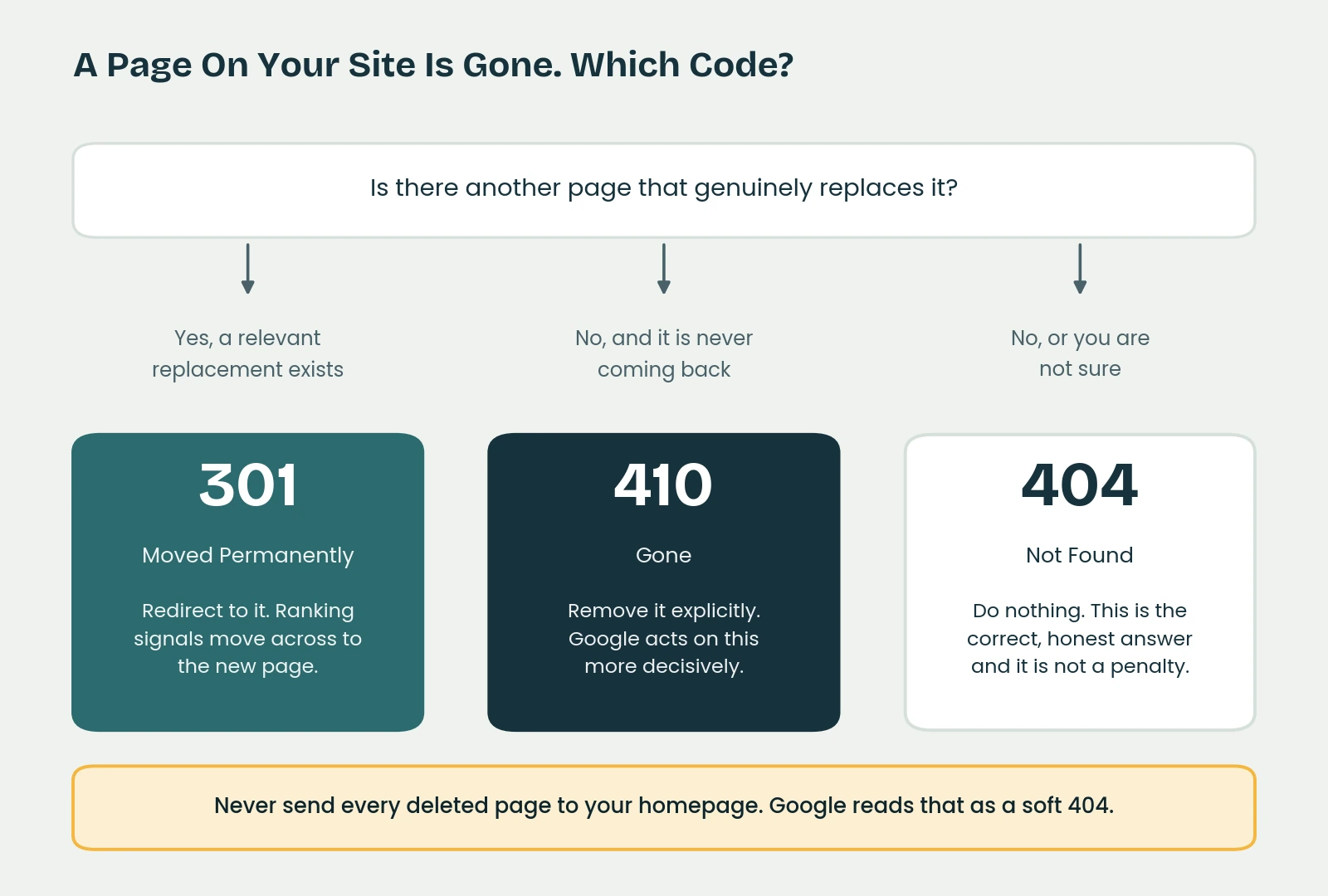
So the rule I use is this. Ignore 404s that nobody visits. Redirect the ones that get traffic or have links pointing at them, and send them somewhere genuinely relevant rather than dumping everything on the homepage. And make sure the 404 page itself is useful, with your navigation, a search box and a route back into the site, because that is the difference between a dead end and a detour.
The whole decision, on one page. The mistake at the bottom is the one I see most often.
404 or 410: When to Use Each
Both remove the page. The difference is one of certainty.
A 404 says “this is not here”. It leaves open the possibility that it might come back, or that something has gone temporarily wrong. A 410 says “this existed, it is gone, and it is not coming back”. Because it is explicit, it tends to be acted on more decisively.
Use a 410 when you have genuinely retired something and you want it out: a discontinued product line, an expired offer, a page you published and regret. Use a 404 for everything else, including the enormous volume of requests for URLs that never existed in the first place. In practice the difference is modest, and it is not worth rebuilding your site over. It is worth knowing.
403 Forbidden: The One Actually Worth Checking
A 403 means the server understood the request perfectly and refused it. That is correct for a private area. It is a serious problem when it happens to Googlebot on a page you want indexed, and it happens more often than people expect.
The usual culprit is a security plugin or a firewall that has decided Googlebot looks suspicious and blocked it, sometimes after an aggressive crawl, sometimes because of a badly configured country block. Your pages load perfectly for you. Google sees a locked door and eventually stops knocking.
If pages are dropping out of the index for no visible reason, test them with the URL Inspection tool in Search Console rather than your own browser. Your browser is not the visitor that matters here.
429 Too Many Requests
A 429 tells a client it is asking too often. Google treats it as a server error signal rather than a client error, and responds by slowing down its crawling.
Occasionally this is deliberate and fine. More often it is a rate limiting rule, or a host with tight resource limits, throttling Googlebot by accident. If a large site is being crawled slowly and 429s are showing in the logs, that is the reason.
401, 402, 451 and the Teapot
A 401 means the page requires a login, which is correct for a members area and should not be indexed anyway. A 402 Payment Required has been reserved for decades and barely used. A 451 Unavailable For Legal Reasons is the one used when content is blocked for legal reasons, and it carries a deliberate nod to Ray Bradbury. It has real UK relevance for content blocked under court order.
The specification formally registers 418 as unused, because it was an April Fools joke in 1998 about a teapot refusing to brew coffee. It has survived every attempt to remove it, which tells you something warm about the people who maintain these standards. It will never appear on your website.
Soft 404, The One That Quietly Costs You Pages
This is the most expensive item on the entire list, and it is not a status code at all.
A soft 404 is a page that says one thing and returns another. The visitor sees “No products found” or “Sorry, that page does not exist”. The server, meanwhile, cheerfully returns a 200, which tells Google this is a real page worth considering.
Google catches this. It compares what the page says to what the code claims and makes its own judgement, and the page gets flagged as a soft 404 and dropped. The damage is that nobody notices, because nothing looks broken. The page loads. It just quietly stops existing in search.
The usual sources on real sites:
- Empty category or tag pages on WordPress, generated automatically and never populated.
- Out of stock or discontinued products on Shopify and WooCommerce that still resolve to a page saying the item is unavailable.
- Internal search results pages with no results, which get crawled because something linked to them.
- Pages that redirect to the homepage instead of returning a 404, which Google specifically treats as a soft 404.
That last one is worth repeating, because it is such a common instinct. Redirecting every deleted page to your homepage feels tidy and helpful. Google reads it as a soft 404, because the homepage is obviously not a replacement for the page that was requested. If there is a genuinely relevant replacement, redirect to it. If there is not, return a proper 404 and let the page go.
Search Console reports these under “Soft 404” in the page indexing report, and unlike the 404 report, this one is worth reading properly.
5xx Server Error
Eleven codes. This is the range where sustained problems do real damage.
| Code | Name | Plain English | What Google Does | Act? |
|---|
| 500 | Internal Server Error | Something broke, unspecified | Slows crawling, eventually drops pages | Yes |
| 501 | Not Implemented | I do not support that request | Drops the URL | Rarely |
| 502 | Bad Gateway | The server behind me gave a bad answer | Slows crawling | Yes if persistent |
| 503 | Service Unavailable | Temporarily down, try later | Holds off, preserves pages initially | Configure properly |
| 504 | Gateway Timeout | The server behind me took too long | Slows crawling | Yes if persistent |
| 505 | HTTP Version Not Supported | I do not speak that version | Drops the URL | No |
| 506 | Variant Also Negotiates | Server misconfiguration | Drops the URL | Rarely |
| 507 | Insufficient Storage | I have run out of space | Drops the URL | Yes |
| 508 | Loop Detected | I am going in circles | Drops the URL | Yes |
| 510 | Not Extended | Obsolete | Nothing | No |
| 511 | Network Authentication Required | Log into this network first | Drops the URL | No |
Google’s behaviour across this range is consistent. A 5xx tells the crawler to slow down. Pages already in the index are preserved at first, on the reasonable assumption that a server error is temporary. If the errors continue, those pages are eventually dropped. Once normal 200 responses resume, crawl rate recovers gradually rather than instantly.
503: The Only Code Worth Configuring in Advance
A 503 says “I am temporarily unavailable, come back later”. Used properly it is the most useful code on this entire list, because it is the only one that lets you take your site down without consequence.
Gary Illyes of Google addressed the threshold directly in April 2024. Serving a 503 for an extended period will reduce your crawl rate, but as he put it, “10-15 minutes every now and then is not ‘extended’ by any means”. Short, occasional maintenance windows are a non-event.
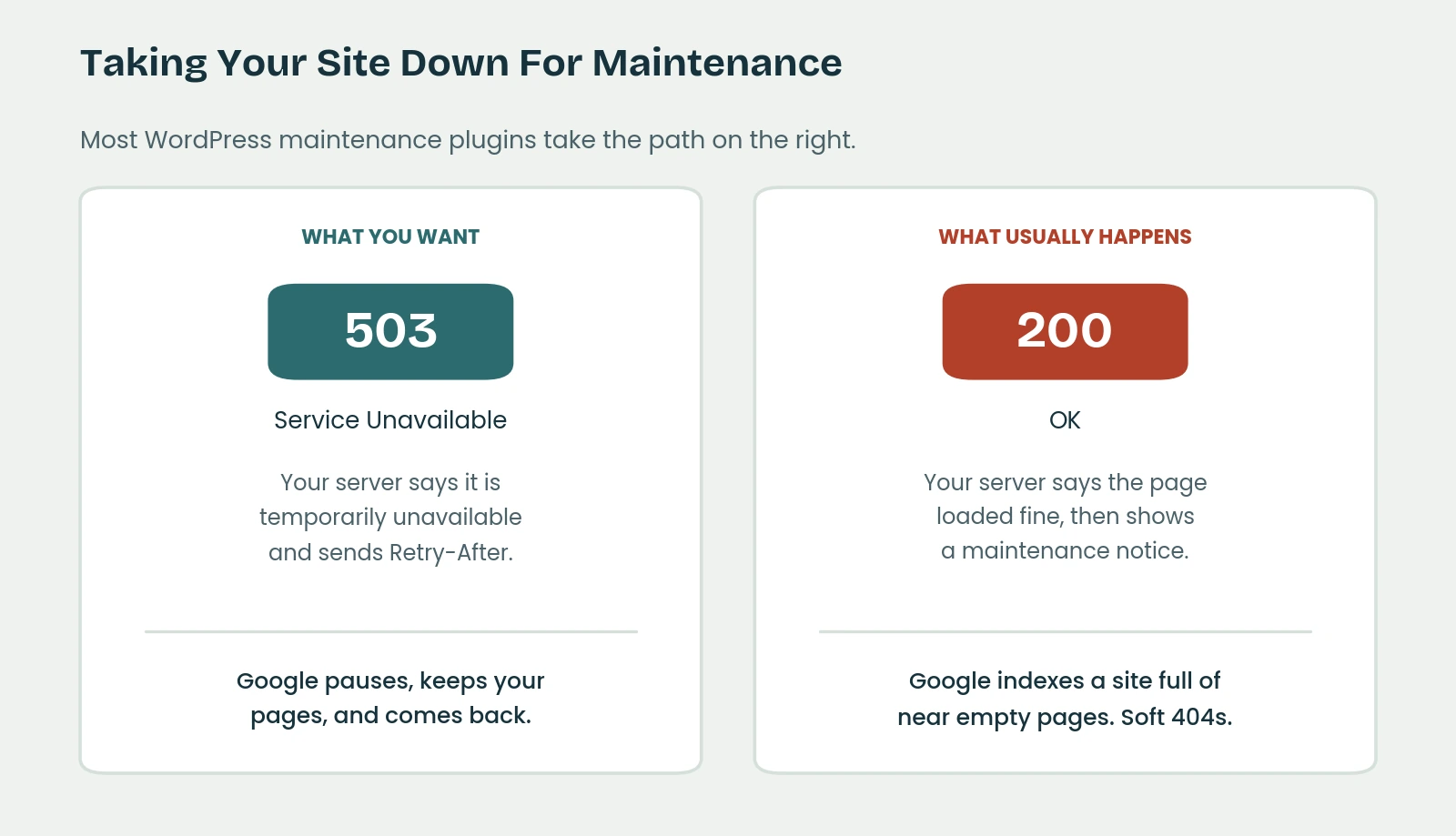
The catch, and this is the part worth acting on, is that most WordPress maintenance mode plugins do not return a 503 at all. They return a 200 with a page saying the site is down for maintenance. Google receives a successful response containing almost no content, on every page of your site at once, and draws the obvious conclusion. An afternoon of maintenance becomes a site full of thin or soft 404 pages.
The difference between a pause and a problem is one number and one header.
A correct maintenance response returns a 503 and includes a Retry-After header telling Google roughly when to come back. If you are planning anything that will take your site offline for more than a few minutes, this is worth checking before you start rather than after.
500, 502 and 504
A 500 is the generic “something broke and I am not going to tell you what”. On WordPress it usually means a plugin conflict, a PHP error or an exhausted memory limit. A 502 and a 504 both point at something behind the server, typically a PHP process or a database that failed or took too long, and both are common symptoms of a site that has outgrown its hosting.
Occasional instances are noise. A pattern is a warning. If these appear in Search Console with any regularity, the problem is the hosting or the code, and no amount of SEO work compensates for a site that intermittently refuses to load.
The Codes That Are Not in the Registry
Here is the part no specification will give you. Some of the codes you are most likely to encounter are not official at all, because they are invented by the software sitting in front of your website.
Cloudflare sits in front of a very large share of UK small business sites, and it issues its own.
| Code | Name | What It Usually Means |
|---|
| 520 | Web Server Returns An Unknown Error | Your server gave an answer Cloudflare could not parse |
| 521 | Web Server Is Down | Your server refused the connection |
| 522 | Connection Timed Out | Your server did not answer in time |
| 523 | Origin Is Unreachable | Cloudflare cannot find your server, often a DNS problem |
| 524 | A Timeout Occurred | Your server connected but took too long to finish |
| 525 | SSL Handshake Failed | The secure connection could not be established |
| 526 | Invalid SSL Certificate | Your certificate is expired or not trusted |
| 530 | Paired With A 1xxx Error | Cloudflare’s own error, shown alongside a separate code |
A few others appear in the wild. Nginx uses 444 to close a connection without any response at all, and 499 when the visitor gave up before the server finished. Microsoft IIS uses 440 for a login timeout.
None of these are in the registry. All of them can take your website offline. If you see a number in the 520s, the problem is between Cloudflare and your hosting, and your hosting provider is the correct first call.
Reading Search Console Without Guessing
Search Console does not use status codes as its labels, which is a large part of why the page indexing report confuses people. Here is the translation.
| Search Console Says | The Code Behind It | Does It Need Action |
|---|
| Not found (404) | 404 | Usually not, unless the URL has traffic or links |
| Soft 404 | 200 on a page with no real content | Yes, this one matters |
| Page with redirect | 301, 302, 307 or 308 | No, this is informational |
| Server error (5xx) | 500, 502, 503, 504 | Yes, if it persists |
| Blocked due to access forbidden (403) | 403 | Yes, check Googlebot is not blocked |
| Blocked due to unauthorized request (401) | 401 | No, if the page is genuinely private |
| Excluded by noindex tag | 200, plus a noindex instruction | Only if it was unintentional |
| Alternate page with proper canonical tag | 200, pointing elsewhere | No, this is working correctly |
| Discovered, currently not indexed | Usually 200, Google chose not to crawl yet | Not a code problem, usually a quality or crawl budget signal |
| Crawled, currently not indexed | 200, crawled and rejected | Not a code problem, this is a content judgement |
The last two are the ones that generate the most anxiety and have the least to do with status codes. Neither indicates an error. Both mean Google found the page, understood it perfectly, and decided it was not worth indexing yet. That is a content problem wearing a technical costume, and no amount of fiddling with your server configuration will fix it.
How to Check Your Own
Start free. In Chrome, press F12, open the Network tab, reload the page and look at the Status column. The first row is the page itself. That is the code your server is actually returning, which is not always the code you assume it is returning.
For one URL at a time, a browser based header checker will do the job. For a whole site, Screaming Frog crawls up to 500 URLs free, which covers most small business sites completely. Crawl the site, sort by status code, and you will have every redirect, every 404 and every server error in about ten minutes.
Three checks are worth running on any site you care about.
- Crawl the site and look at every non-200 response. Chains and loops show up immediately.
- Check what your maintenance mode plugin actually returns, before you need it rather than during an outage.
- Test a handful of important pages with the URL Inspection tool in Search Console, because that shows you what Google sees rather than what you see.
The Honest Summary
Of 64 registered status codes, four deserve real attention on a normal small business website.
Get your 301s right, because that is where rankings move. Check that nothing is serving a 403 to Googlebot. Configure a proper 503 before your next maintenance window. And go looking for soft 404s, because they are the only ones on this list that do damage without leaving any evidence that something is wrong.
Everything else on the list is either working correctly or is not your problem. The 404 report is a log, not a to-do list. The 1xx range will never trouble you. And 418 remains a teapot.
Not Sure What Your Site Is Actually Returning?
Most of the problems on this list are invisible from the front end. As part of a technical SEO audit I crawl the whole site, check every status code it returns, and tell you in plain English which ones are costing you something and which ones you can safely ignore.
If the answer turns out to be that nothing is broken, I will tell you that instead.
Technical SEO Audit