You ran the test. Google handed you a number in an angry red circle, somewhere in the thirties, and a list of problems you did not understand involving render-blocking resources and unused JavaScript.
So you did what everybody does. You searched for the fix, found a hundred articles recommending a caching plugin, installed one, cleared the cache and ran the test again.
The number moved by four points.
This happens constantly, and it is not because you did it wrong. It is because the number you were chasing and the thing that makes your site slow for real customers are two different problems. Almost everyone writing about this has a commercial reason not to mention that. Search for the answer and the results are hosting companies, plugin vendors and monitoring tools, all of whom arrive at the conclusion that what you need is hosting, a plugin, or a monitoring tool.
Here is the version with nothing to sell you at the end of the first paragraph.
The Short Version
- The score you are staring at is probably not a measurement. For most small business sites Google has no real visitor data to show, so PageSpeed Insights falls back to simulating a single mid-range phone on a throttled connection.
- Installing another plugin moves that simulation far more often than it moves anything a customer notices.
- Your host sets the floor. Nothing loads until the server answers, and no plugin buys back time it has already spent.
- Your theme sets the ceiling. It decides how much must be downloaded before anything appears, and it is the hardest of the three to change later.
- Your plugins matter, but not how many you have. What matters is how many of them load code on pages where their features are never used.
The Number You Are Staring At Is Probably Not a Measurement
PageSpeed Insights shows you two completely different things, and it does not make much of a fuss about which is which.
- Field data is what real people experienced on your site, gathered from Chrome users over the previous 28 days. It is the thing Google uses when it assesses your pages.
- Lab data is a test Google runs on demand, simulating one mid-range phone on a deliberately slowed connection. It is repeatable, useful for diagnosis, and it is where the big number in the coloured circle comes from.
Now here is the part that matters for a small business. Field data only appears once your site clears a popularity threshold. Google is explicit about this in its own documentation, and just as explicit about the consequence: PageSpeed Insights is less useful when that data is not available, because in those cases it can only show you the lab test.
If you run a locksmith business in Wallasey and you get three hundred visits a month, you are almost certainly below that line. There is no field data for your site. Nobody’s actual experience is being reported to you. The number you have been losing sleep over is a simulation of one phone that has never visited your website.
Google goes further still. Its guidance notes that the Lighthouse recommendations are useful where the lab results and the real world agree, and that where they do not agree, those recommendations may be less relevant.
Read that again, because it is the whole argument. Google is telling you that the list of fixes underneath your score may not apply to your site, and it has no way of knowing whether it does, because it cannot see your visitors either.
What Google Actually Measures
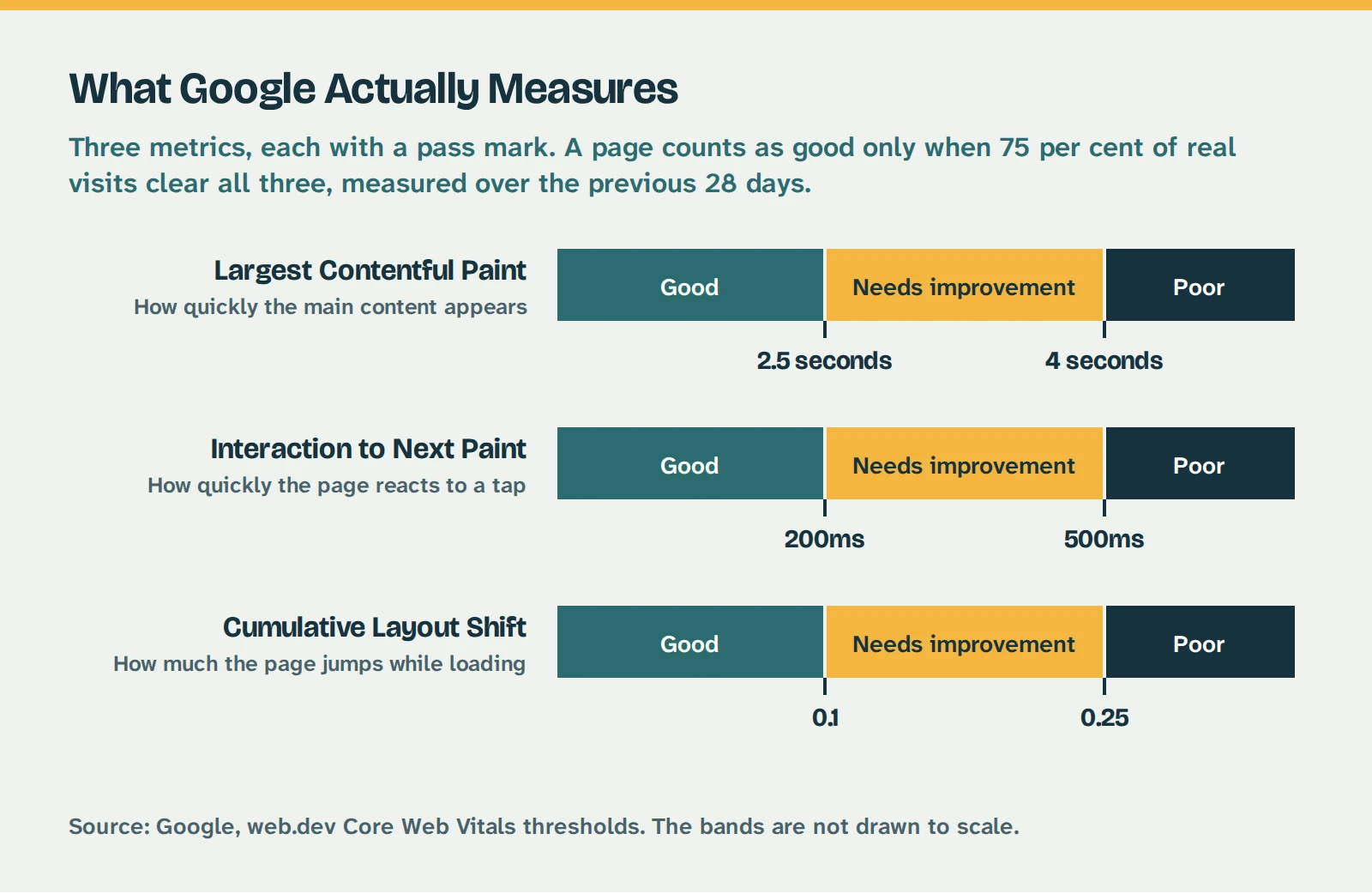
When Google does have real data, it grades three things.
The three things Google grades your pages on. A page passes only when 75 per cent of real visits clear all three. Source: Google, web.dev.
- Largest Contentful Paint is how long the main thing on the page takes to appear, usually your header image or your headline. Under 2.5 seconds is good.
- Interaction to Next Paint is how quickly the page reacts when somebody taps something. Under 200 milliseconds is good. It replaced an older measure in March 2024, so any advice mentioning First Input Delay is out of date.
- Cumulative Layout Shift is how much the page jumps about while it loads. If you have ever gone to tap a link and hit an advert instead because the page moved underneath your thumb, that is what this measures. Under 0.1 is good.
Two details are worth holding on to. A page only passes when 75 per cent of real visits clear all three, so this is not an average, it is closer to a worst-case guarantee. And because the window is 28 days, a fix you make this morning will not show up this afternoon. It takes weeks. Anyone promising you an overnight change to these numbers is describing the lab test, not the real one.
Why WordPress Sites Are Slow More Often Than They Should Be
WordPress has a genuine reputation problem here, and it is worth being straight about it rather than defensive.
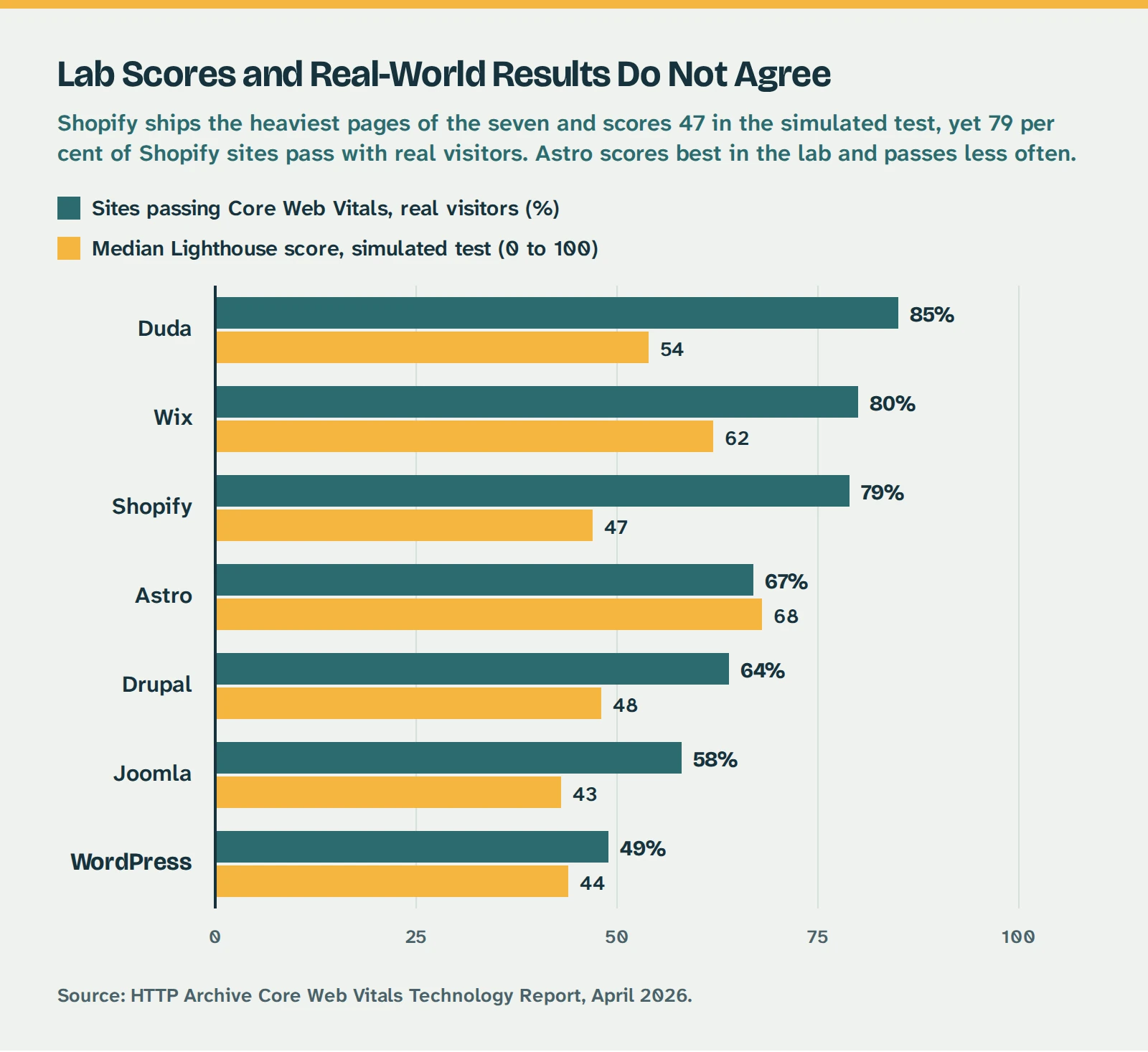
Shopify carries the heaviest pages of the seven and scores 47 in the simulated test, yet it beats every platform below it in the real world. Source: HTTP Archive Core Web Vitals Technology Report, April 2026.
Roughly 49 per cent of WordPress sites pass Core Web Vitals with real visitors. That is last out of the seven platforms tracked. Duda passes 85 per cent of the time and Wix 80 per cent.
The obvious reaction to that chart is that you should have built the thing on Wix. That is a fair question and it deserves a proper answer rather than a defensive one, which is why it has its own post. The short version is that for some businesses the answer is genuinely yes.
But look at what the chart is really showing, because there is something stranger going on.
Shopify ships the heaviest pages in the comparison at 3.77MB. It scores 47 in the simulated lab test, which is nearly as bad as WordPress at 44. And it still passes for 79 per cent of real visitors, beating four platforms with lighter pages and better lab scores. Astro has the lightest pages of anyone and the best lab score of anyone, and passes less often than Shopify does.
So the lab test and the real world are not measuring the same thing, and they do not even put the platforms in the same order.
What separates them is not weight. It is control. Duda, Wix and Shopify make thousands of technical decisions on your behalf and refuse to let you make them badly. WordPress hands you every one of those decisions. That is exactly why WordPress is worth using, and exactly why so many WordPress sites are slow. The platform is not the problem. The unsupervised freedom is.
Which brings us to what you actually do about it.
Why Installing Another Plugin Rarely Fixes It
A caching plugin does something specific and genuinely valuable. Normally, every time somebody visits your site, WordPress wakes up, runs a pile of PHP, queries the database several times, assembles a page from scratch and sends it out. A caching plugin builds that page once, saves the finished copy and hands the same copy to the next visitor. Less work per visit, faster response.
That is real. On a site with no caching at all, adding it is one of the most worthwhile things you can do, and I am not going to pretend otherwise.
The problem is what happens next.
Once caching is in place, the remaining features in these plugins tend to target the exact things the lab test scores you on. Combining files, deferring scripts, stripping unused CSS. Tick enough boxes and the simulated number climbs nicely, which feels like progress because you have visible evidence of progress.
Meanwhile the real experience may not have changed at all, and occasionally it gets worse. Deferring the wrong script makes the page look finished before it works. Stripping CSS too aggressively makes it flash unstyled for half a second on the way in. Neither of those things shows up in a score. Both of them show up in how your site feels.
Then there is the stacking problem, which I see more often than any other issue on sites that come to me. Somebody installs a caching plugin. Six months later a different article recommends an image optimisation plugin, so that goes on too. Then a lazy loading plugin, because a third article said so. Now three plugins are minifying the same files, three are deciding what to defer, and they are quietly undoing each other’s work. The site is slower than it was with one of them, and considerably harder to diagnose.
It Is Not How Many Plugins, It Is What They Load
The advice you will read everywhere is to use fewer plugins. It is a decent rule of thumb and a poor rule.
What actually costs you is not the number of plugins installed. It is how many of them load code on pages where their features are not being used.
Consider two plugins on the same site.
- A contact form plugin that loads its scripts only on the contact page costs your homepage nothing at all.
- A slider plugin that loads its own JavaScript library, its own stylesheet and a font file on every page costs you on all of them, including the pages with no slider on them.
One of those is invisible. The other is a tax on every visit. Both count as one plugin.
This is why the count is such a bad measure. Twenty carefully chosen plugins that each mind their own business will beat six sprawling ones every time. I have seen sites with thirty plugins load faster than sites with eight.
Two related questions come up constantly, so here are direct answers.
- Deactivated plugins do not slow your site down. They are not loaded, so they cost nothing per visit. They are still worth deleting, because inactive plugins do not stop having security holes, but that is a different reason entirely. Deleting them will not make your site faster.
- A plugin being old is not the same as a plugin being slow. A simple plugin that has not needed an update in two years is often the best-behaved thing on your site. Age tells you about maintenance risk, not performance.
Your Theme Sets the Ceiling
Your theme decides more about your site speed than every plugin combined, and it is the hardest thing on this list to change afterwards.
Multipurpose themes are the usual culprit, and it is not because their authors are careless. It is because of what they are for. A theme sold to forty thousand different businesses has to be able to demo a restaurant, a gym, a law firm and a photography portfolio, so it ships with sliders, portfolio grids, pricing tables, animation libraries, icon sets and half a dozen fonts. You use four of those things. Depending on how the theme is built, your visitors may download all of them anyway.
Page builders sit in the same territory. They are enormously useful, they are how a lot of good sites get built, and they add weight. A page assembled from nested builder rows produces considerably more markup than the same page built directly, and that markup arrives on every visit.
None of this makes those themes wrong. It makes them a decision. And it is the one decision here you cannot unpick with an afternoon of tinkering, because changing theme means rebuilding the site. That is why theme choice belongs at the start of a project rather than in a list of speed fixes, and why “which theme is this built on” is one of the first things worth knowing about a site you have inherited.
Your Host Sets the Floor
Everything above is about how much work the browser has to do. This one is about whether it gets to start at all.
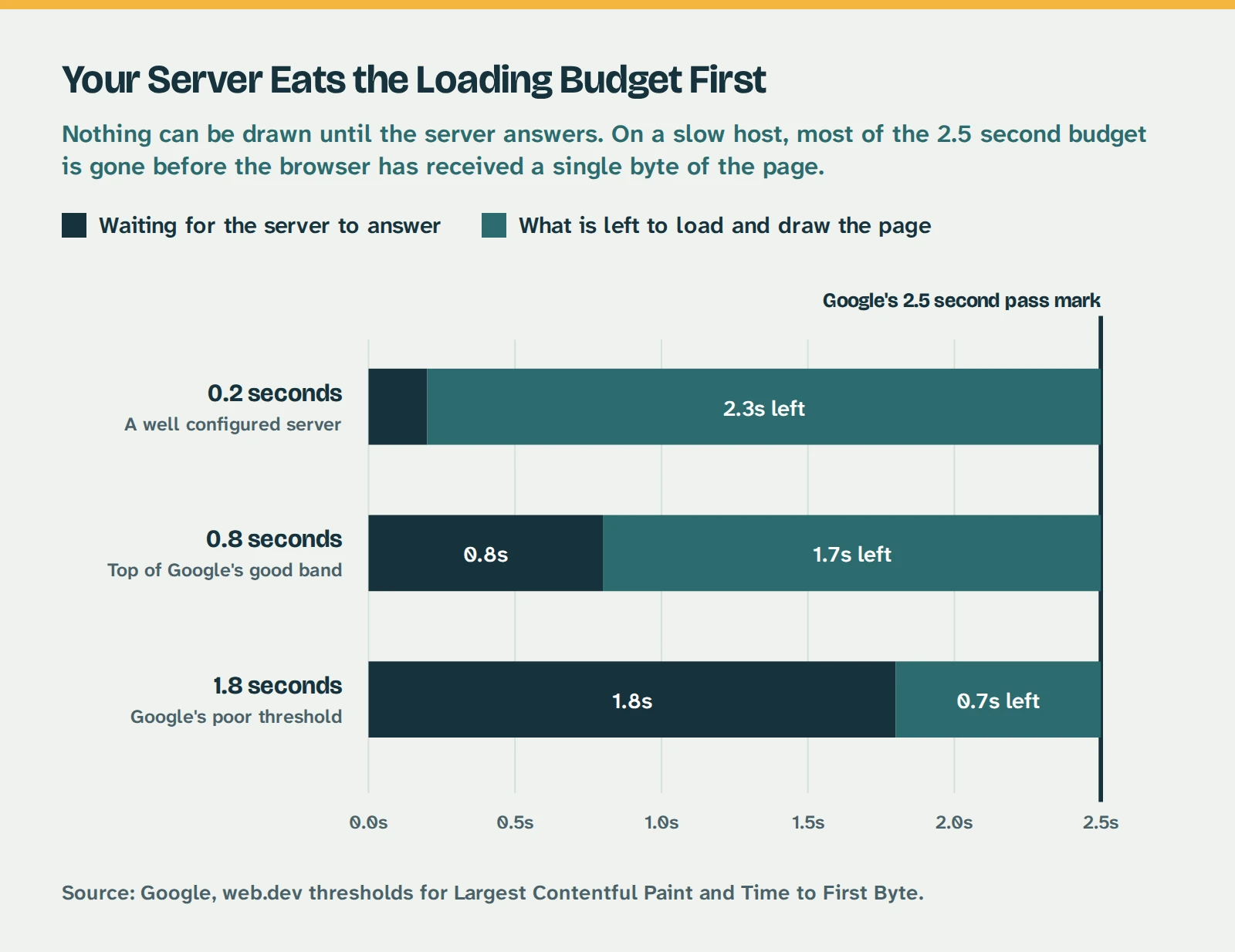
At Google’s poor threshold for server response, you have 0.7 seconds left to download and draw the entire page. No plugin buys that time back. Source: Google, web.dev.
Nothing can be drawn on screen until your server answers the request. That waiting time comes out of your budget before a single image loads, before any code runs, before anything at all appears.
Google’s pass mark for the main content appearing is 2.5 seconds. It rates server response under 800 milliseconds as good and anything over 1.8 seconds as poor. So on a server sitting at Google’s poor threshold, you have 0.7 seconds left to download and render your entire page.
That is not a tuning problem. It is arithmetic. There is no plugin, no setting and no optimisation service that buys back time your server has already spent. If your host is the constraint, every hour you spend on images and scripts is being spent inside a budget somebody else has already emptied.
Three things sit entirely with your host and nowhere else:
- How quickly the server answers, which sets the ceiling on everything measured afterwards.
- Whether it slows down when the neighbours are busy. Cheap shared hosting is cheap because your site sits on a machine with a few hundred others, all competing for the same processor.
- Which version of PHP your site runs on. Newer versions are meaningfully faster than the ones a lot of sites are still sitting on, and it is usually a setting rather than a project. That is worth a post of its own and it is coming.
The middle one has a free test attached. Check your speed at nine in the morning, then again at eight in the evening. If the difference is large and consistent, you are not looking at a website problem, and nothing you change on the site will fix it.
Moving host is the right answer more often than people expect, and it is a proper job rather than a Sunday afternoon one, so it is worth doing carefully. If you would rather it was simply somebody else’s problem, that is what hosting and maintenance covers.
The Technical Bits That Genuinely Move the Needle
Assuming your host and theme are reasonable, this is the short list that survives contact with a real site.
- Never lazy load the image at the top of the page. Lazy loading is good and this one exception matters enormously. Telling the browser to delay the largest visible image is the single most common self-inflicted speed problem I see, and it directly damages the metric Google cares most about.
- Put width and height on every image, video and embed. This costs nothing and stops the page jumping about as things arrive. It is the entire fix for most layout shift problems.
- Serve images at the size they are displayed. A 4000 pixel photograph from a phone, displayed in a 600 pixel space, wastes most of what it downloads. Resize before uploading, or use something that does it for you.
- Cut the number of separate things that must load before the page can draw. Every stylesheet and script that blocks rendering is another round trip before anything appears.
- Be ruthless about third party scripts. Chat widgets, review carousels, tracking pixels and embedded maps are the heaviest things on most small business sites, and they are heavy on someone else’s server, which means you cannot optimise them. You can only decide whether each one earns its place.
- Clear out the database on an older site. Years of post revisions, expired temporary data and leftovers from plugins you removed all make every page request do more work.
None of these are exciting. All of them are worth more than a fourth optimisation plugin.
How to Tell Which of the Three Is Your Problem
Before you spend anything, work out what you are actually dealing with.
| What You Are Seeing | Most Likely Cause | What Actually Fixes It |
|---|
| Even the simplest page is slow | Server response, before your page is involved | Caching first, then a better host |
| Homepage slow, plain pages fine | Theme and page weight | Reduce what is on the page, or reconsider the theme |
| Slow at some times of day, fine at others | Shared hosting contention | Better hosting. Nothing on your site will fix this |
| Fast for you, slow for everyone else | Browser caching on your machine flattering you | Test in a private window, on mobile data, on a normal phone |
| Looks fast, does not respond when tapped | Too much JavaScript, usually third party | Remove scripts that do not earn their place |
| Public site fine, admin area slow | Database size, or a plugin working in the background | Database cleanup, and identify the plugin responsible |
| Content jumps about while loading | Missing image dimensions, late-loading embeds | Add width and height, reserve space for embeds |
If two or three rows apply, start with the server one. Everything else is measured inside the time your host leaves you.
When a Slow Site Is Not Worth Fixing
The usual way to end an article like this is with a large number about lost revenue.
The best study on this is genuine and worth knowing about. Deloitte and Google measured 37 retail, travel and lead generation brands across 30 million sessions, and found that improving mobile speed by a tenth of a second lifted retail conversions by 8.4 per cent and average order value by 9.2 per cent. Travel conversions rose 10.1 per cent. A tenth of a second is below the threshold at which you consciously notice anything, and it still moved money.
Those are real figures. They are also figures from large brands with enormous traffic, and quoting them at a hairdresser with 200 visits a month is precisely the trick used by people selling speed optimisation services. On that kind of traffic, an 8 per cent improvement in conversion is a fraction of one enquiry a month. It is not nothing, but it is not a reason to spend £600.
Google’s own position is similarly unglamorous. Its search advocates have described these metrics as more than a tiebreaker but considerably less important than whether your content is relevant, and have said outright that chasing a perfect score purely for search reasons may not be the best use of your time.
So here is the honest test. If your site loads in about three seconds, your customers ring you, and your enquiries are steady, speed is not your bottleneck. Your money is better spent on the pages themselves, on being findable locally, or on nothing at all this quarter.
Fix it when it is genuinely bad:
- A site that takes six seconds on a phone is losing people who would have rung you.
- A site that jumps about while loading feels broken, and people treat businesses with broken-looking websites accordingly.
- A site that only works properly on the office wifi is failing most of the people trying to reach you.
Fix it because it is bad for the people using it. The score is a symptom, and a badly calibrated one at that.
Not Sure Which of the Three It Is?
Most slow WordPress sites come down to hosting, the theme, or plugins loading things they do not need to. Working out which one is usually a twenty minute job, and it is worth knowing before you spend anything. Care plans start at £35 a month, with pricing published in full and no account manager between you and the person doing the work.
Hosting and Maintenance