Paul Campbell is an electrician. When I rebuilt his website, moving it off GoDaddy’s website builder and onto WordPress, his site moved up more than 50 places in Google. That is his wording, from his own review, not mine.
I mention it because it is the opposite of what most people expect from a redesign. Search the subject and you will find a great deal of writing designed to worry you, most of it published by companies that sell migration services. The general message is that a redesign puts your rankings at risk and you had better hire someone to protect them.
Half of that is true. A redesign can cost you traffic, and I have watched it happen. But the cause is almost never the thing people are warned about, and Google is considerably more relaxed about this than the internet is.
Search is what I do full time. Web design is what I do freelance. Both of those inform what follows, and neither of them makes this as frightening as the writing on the subject suggests.
“Evans Creative redesigned my electrical website and it jumped up 50+ places in the Google listing. Excellent service, would highly recommend.”
Paul Campbell, Electrician
What Actually Goes Wrong
The pattern is familiar. The new site goes live. It looks far better than the old one. Everybody is pleased. Six weeks later the phone is quieter, and nobody connects the two things, because how could a better looking website be the problem?
It is usually not the design. It is one of a small number of unglamorous failures.
The page addresses changed and nobody redirected them. Your page at /services/emergency-electrician is now at /what-we-do, and the old address returns an error. Every link pointing at it, every bookmark, and every position Google had recorded now points at nothing.
The site launched with its build settings still switched on. Sites are usually built at a hidden address and deliberately blocked from search engines, so a half finished site does not get indexed. That block has to be removed at launch. Google lists it first among the common mistakes people make during a site move, which tells you how routinely it happens.
The page that ranked got designed into nothing. The nine hundred words about emergency callouts that actually brought in the work become a full width photograph, three bullet points and a contact button. It looks considerably better. It ranks for considerably less.
None of those are design failures. They are process failures, which is a more encouraging thing to be dealing with.
Google Is Calmer About This Than the Internet Is
Google publishes its own guidance on moving a site, and it is a public document anyone can read. Two things in it get skipped by almost every article on this subject.
Permanent redirects do not cost you ranking value. Google’s documentation says directly that 301 and other permanent redirects do not cause a loss in PageRank. The authority your site has built up over the years is not taxed on the way across. It transfers. The entire anxiety industry around redesigns rests on a fear that Google has explicitly addressed.
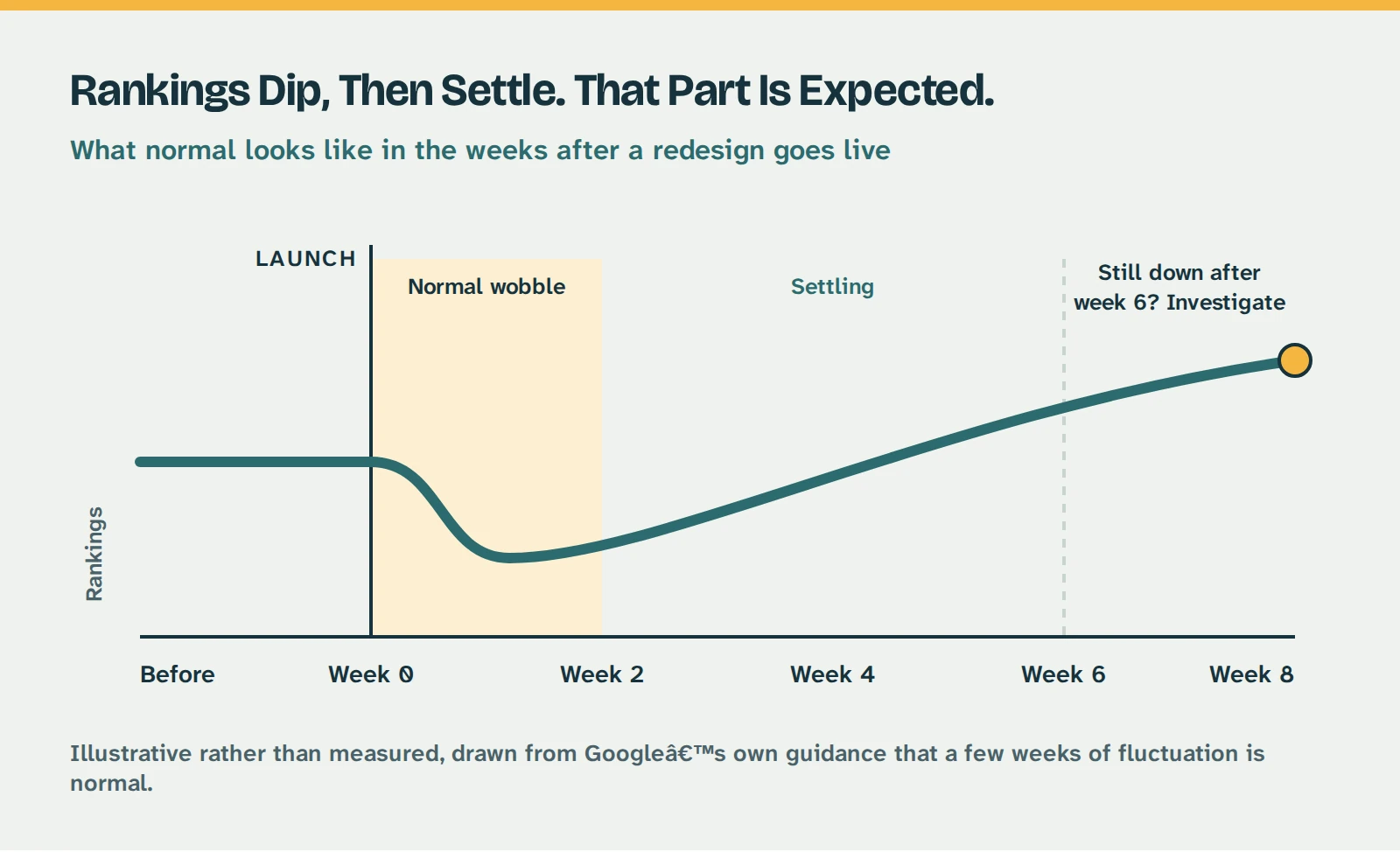
Some movement afterwards is normal and expected. Google tells site owners to expect temporary fluctuation in rankings during a move, and notes that for a medium sized site it can take a few weeks or more before the new addresses are consistently showing instead of the old ones. Positions wobbling for a fortnight after launch is not a catastrophe. It is the documented behaviour.
That reframes the whole job. You are not defending yourself against Google. You are making sure there is a trail for Google to follow.
The Three Things That Genuinely Cost You Traffic
One: The URLs Change and Nobody Maps Them
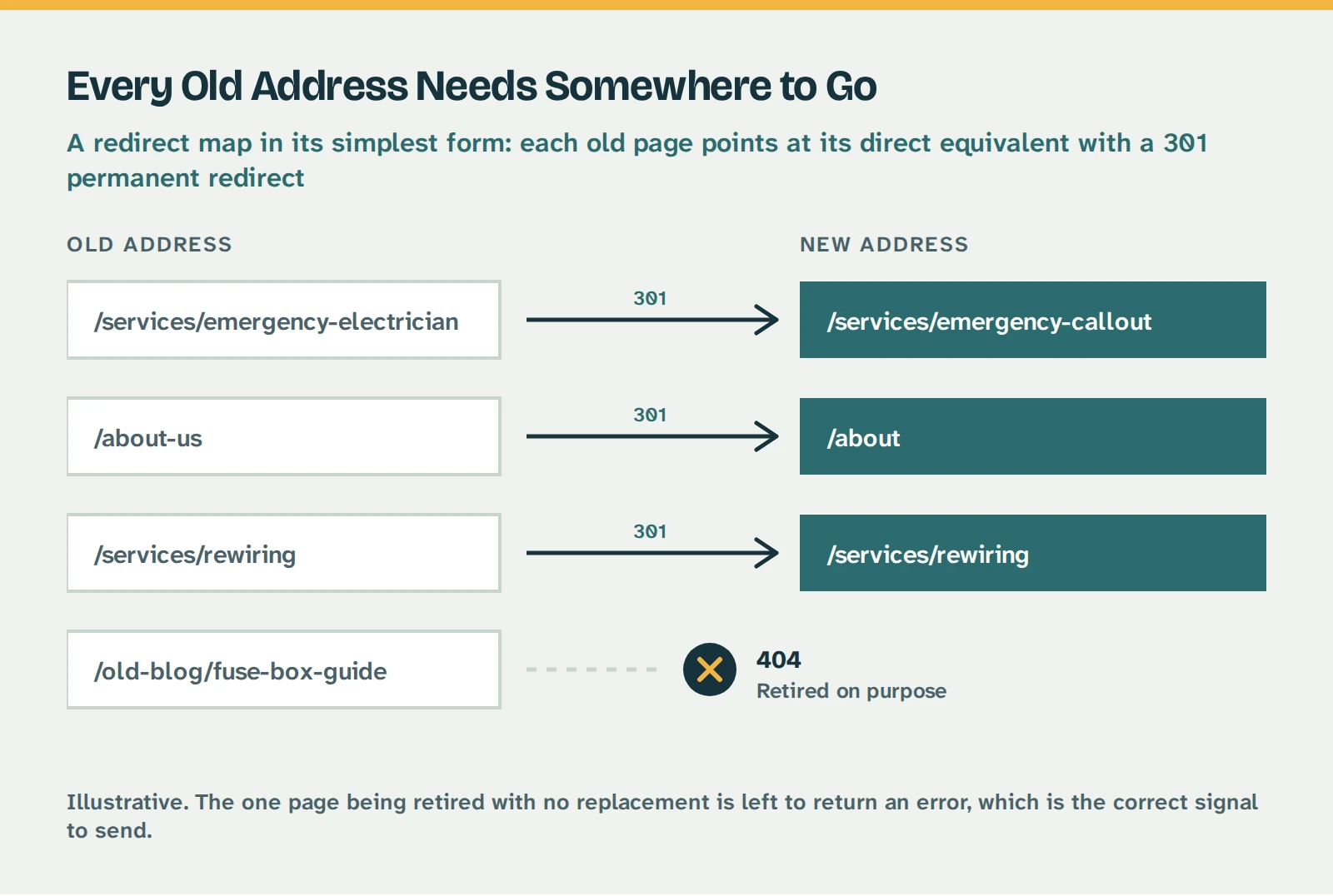
If a page address changes, the old address needs a permanent redirect pointing at the new one. Specifically at the new equivalent page, not at the home page. Google warns against redirecting a large number of old addresses to a single irrelevant destination such as the new home page, and says it can be treated as a soft 404, which is Google’s way of saying the page might as well not exist.
Worth knowing too: avoid chains. Old page redirects to a second page, which redirects to a third. Google can follow a chain, but its guidance is to point straight at the final destination and keep any chain to no more than three hops.
A redirect map in its simplest form. Every old address points at its direct equivalent, and the one page being retired is left to return an error on purpose.
Two: The Content Gets Thinned Out
This is the failure designers cause, and I include the profession I work in. Contemporary design favours space and restraint. Search favours substance. If a page ranks today, the words on it are the reason.
You can restyle that page, break it up, add proper images, and make it far nicer to read. What you cannot do is cut it to a third of its length and expect it to hold its position.
Three: Everything Changes at the Same Time
Google’s advice here is unambiguous, and almost nobody follows it: change one thing at a time. If you are moving domain, switching platform and redesigning, do them in sequence rather than together.
I will be honest, that is a counsel of perfection for a small business. Nobody wants to pay for three projects when they were expecting one, and I do not always insist on it myself. But it is worth understanding the trade you are making. If traffic falls after a launch that changed five things at once, working out which of them caused it is close to guesswork.
What to Ask Before You Sign
You are most likely not the person doing this work. You are the person paying for it, which means your leverage is almost entirely in the questions you ask before you commit.
These five separate a designer who has thought about search from one who has not.
- Are any of my page addresses changing, and if so, who is writing the redirects? You want a straight yes or no, and a name. A vague answer means it has not been considered.
- Will you record where I currently rank before we start? Without a benchmark nobody can tell afterwards whether anything was lost, including your designer. If they will not do it, take your own screenshots of Search Console before work begins.
- Is there a staging site I can look at before it goes live? The answer should be yes without hesitation.
- What happens if my traffic drops after launch? You are finding out whether that is a support call or a fresh invoice.
- Which pages are you keeping the existing content from? If the plan is to rewrite everything shorter and cleaner, ask which of those pages currently bring in enquiries.
If someone cannot answer the first question, that is genuinely useful information, and asking costs you nothing.
What to Check Yourself, the Week After Launch
None of these need tools or technical knowledge.
- Search Google for your business name. If your site does not appear at all after a week, something has gone wrong.
- Click your own old links. Find an old email, a social post, a directory listing that points at a specific page. Does it land somewhere sensible, or on an error?
- Check the pages that used to bring in work still exist, and still say something. Not just that the address loads. That there is real content on it.
- Test the contact form and the phone links. Rebuilt sites lose working forms with remarkable regularity. Send yourself an enquiry and see whether it arrives.
- Open Search Console. If nobody has set it up for you, that is worth chasing on its own account.
What Normal Looks Like, and When to Worry
Some movement is expected, and Google says as much. As a rough guide:
- The first fortnight. Positions and impressions bouncing around. Normal.
- Weeks two to six. Things should be settling, and heading back towards where they were or better.
- Past six to eight weeks and still meaningfully down. That is not settling, that is a problem. Look at redirects and indexing before you look at the design.
The signal that matters is not your position on any given day. It is whether the pages that used to bring you enquiries are still being found.
The shape to expect after launch. Illustrative rather than measured, drawn from Google’s own guidance that a few weeks of fluctuation is normal.
If You Are Changing Your Domain Name, This Bit Is Different
Everything above assumes you are rebuilding on the same domain, which covers most small business redesigns. Moving to a genuinely different domain name is a larger job.
- You will need Google’s Change of Address tool in Search Console. Google updated its guidance in June 2026 to say you should submit it for every verified variant of the old domain, including the www and non-www versions, even ones you do not actively use.
- Both the old and the new site need verifying in Search Console first, and again, all variants of each.
- Keep paying for the old domain. Google recommends holding it for at least a year after the move, partly to keep the redirects alive and partly so that nobody else buys your abandoned domain and puts something on it you would rather not be associated with.
If you are not changing domain, none of that applies to you. Google is explicit that the Change of Address tool is not needed for a move from HTTP to HTTPS, for switching between www and non-www on the same domain, or for changing page paths within the same domain. A good deal of published advice tells people to use it anyway.
| Same Domain | Moving to a New Domain |
|---|
| Redirects needed | Only for pages whose address changes | Yes, for every page |
| Change of Address tool | Not needed | Required, for all variants |
| Search Console | Existing property carries on | Verify old and new, all variants |
| Keep the old domain | Not applicable | At least a year |
| Typical settling period | A few weeks | A few weeks or more |
| Main risk | Unmapped addresses, thinned content | All of the above, plus incomplete verification |