Nobody wakes up wanting a website maintenance plan.
What people actually want is to stop thinking about their website. To not have it sitting at the back of their mind on a Sunday night. To never have to work out whether that email from their hosting company matters or whether it is just another upsell.
That is the thing being sold here, and it is worth saying out loud, because it changes how you judge the price. You are buying expertise, yes. But mostly you are buying the hours back, and the not having to care.
So here is what it costs, what each band genuinely gets you, and how to tell whether there is a person behind the plan or a script running unattended.
The Short Version
- Most UK small business sites cost £40 to £100 a month to maintain properly.
- Under about £30 you are usually buying automation, not a person.
- £100 to £250 buys real development time on top.
- £400 and up is for sites where an hour of downtime costs serious money.
- I charge £35, which is at the bottom of that range. The rest of this explains how, and how to check whether any plan is doing what it claims.
What the UK Market Actually Charges
I went and checked published prices rather than guessing.
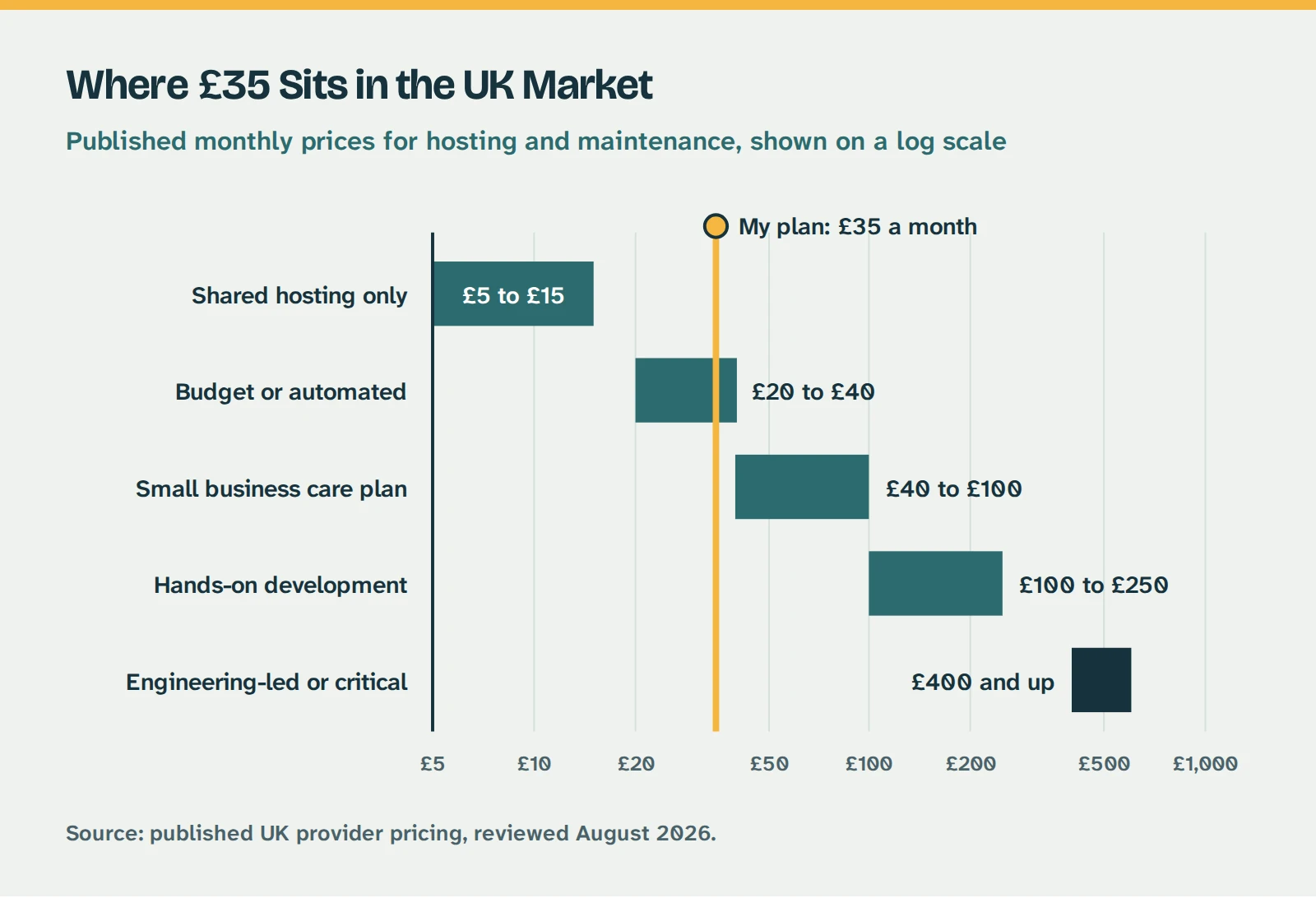
| Price | What It Is |
|---|
| £5 to £15 | Shared hosting. Server space and nothing else. Nobody looking at your site. |
| £20 to £40 | The budget end. Usually automated updates run across hundreds of sites at once. |
| £40 to £100 | Where most small business care plans sit. A person is involved somewhere. |
| £100 to £250 | Adds real development time, faster response commitments, hands-on testing. |
| £400 and up | Engineering-led cover. Ecommerce, booking systems, anything business critical. |
Those bands come from published UK price lists, checked this summer. My own prices are published in full, which is more than most will do. They move around, and one provider’s £75 plan and another’s £75 plan can be doing very different work.
Which is exactly the problem.
Where the £35 sits against the published UK market for hosting and maintenance.
The Bit That Makes the Price Meaningless
Every plan lists the same four words. Updates. Backups. Security. Support. Four words that could mean almost anything.
Backups might mean one copy a week sitting on the same server as your site, which is no use at all if the server is the thing that fails. Or two full copies a day stored somewhere else entirely.
Updates might mean a script that pushes every update the moment it is released and never looks at what happened afterwards. Or somebody applying them to a copy of your site first, checking the contact form still works, then pushing them live.
Support might mean a ticket queue. Or it might mean you send a message and a human replies.
The price only tells you something once you know which version you are getting.
Where I Sit: £35 a Month, and Why That Is Awkward
I charge £35 a month. That puts me at the very bottom of the published UK market, in a band most of the industry writes off as automated. I am aware of that, and I can see why it looks odd when somebody else is charging £90 for what reads like the same list.
So here is exactly what happens for the £35, and the full detail is on my hosting and maintenance page:
- Enterprise UK hosting with a content network and server-level caching
- Business email addresses on your own domain
- Two full backups every day, stored separately from your live site
- Free SSL, renewed automatically
- Daily malware scanning, firewall and DDoS protection
- WordPress core, theme and plugin updates weekly, applied to a staging copy and checked before they touch your live site
- One hour of content changes a month, which you get by emailing me
- Email or WhatsApp me when something looks wrong, and I answer. No ticket system, because there is only me
So How Is It £35?
Because of what I am not paying for. No office in the city centre. No account manager sitting between you and the person doing the work. No sales team, no project coordinator, no monthly all-hands. No stack of software that exists to produce reports nobody reads.
None of that is a criticism of agencies. If you are running a team of fifteen you need an office, somebody has to manage the schedule, and those things cost real money. But it is worth understanding that when you are quoted £90 or £150 a month, a good portion of it is going on things that never touch your website.
I have kept my overheads deliberately low, and £35 is what is left when you strip all that out. It is not a loss leader and it is not a discount I will quietly withdraw in year two.
Why I Want It at £35
The businesses I work with are hairdressers, locksmiths, coffee shops and therapists. People running one van or one chair or one shop.
At £90 a month, most of them just do not buy it. They stay on £5 hosting with nobody looking after the site, not because they do not understand the risk but because it is over a thousand pounds a year and the roof needs doing. So they take their chances, and a few years later something happens.
That is the gap I would rather fill. There is not much point having the best care plan going if the people who need it most are priced out of it.
The honest test is not the price anyway. It is whether the person quoting can tell you what happens on a Tuesday morning when a plugin update breaks something.
First, Let Us Be Fair to WordPress
You will read a lot of frightening things about WordPress security, and most of it misses the point.
- WordPress runs about 41% of all websites, and roughly six in ten sites built on any recognised content management system (W3Techs, August 2026)
- The next biggest, Shopify, is on about 5%
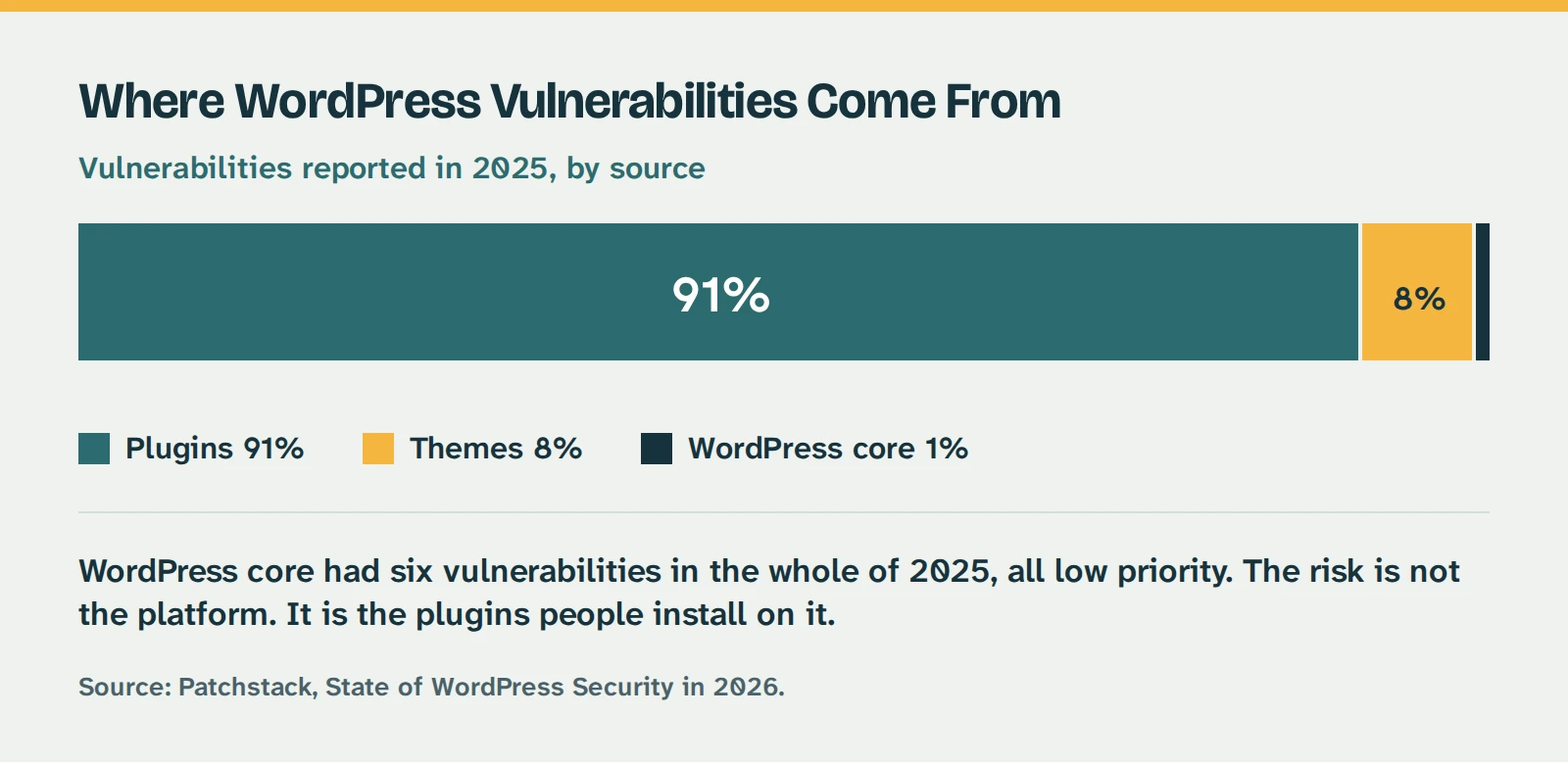
- WordPress core had just six vulnerabilities in the whole of 2025, all low priority
- Around 91% of the vulnerabilities found last year were in plugins, with most of the rest in themes
Where WordPress vulnerabilities actually come from: 91 per cent plugins, 8 per cent themes and 1 per cent core. Source: Patchstack, 2026.
When you are on that many sites, you are what the automated scanners are pointed at. Not because you are weaker, but because you are what is there. A bot sweeping the internet for a way in will look for the thing 41% of sites have.
And the core software itself is genuinely well looked after. Six issues in a year, none of them serious, is a good record by any standard.
The risk is not WordPress. It is the ecosystem around it. That is a problem every platform with third-party extensions shares, because if a system lets you install code written by somebody else, you have inherited that somebody else’s security standards. WordPress just has more of everything, so it makes more headlines.
None of which means avoid WordPress. I build on it because it is flexible, you own it outright, and you can take it elsewhere whenever you like. It does mean somebody needs to pay attention to what is installed on it.
The Four Things People Say to Me
Before the objections, one number that is not from a security company trying to sell you something. The UK’s National Cyber Security Centre reckons one in two small businesses suffers a cyber incident every year, and makes the point plainly: if you think you are too small to be a target, think again.
My Hosting Company Handles Security
They are looking after the server. That is a different job.
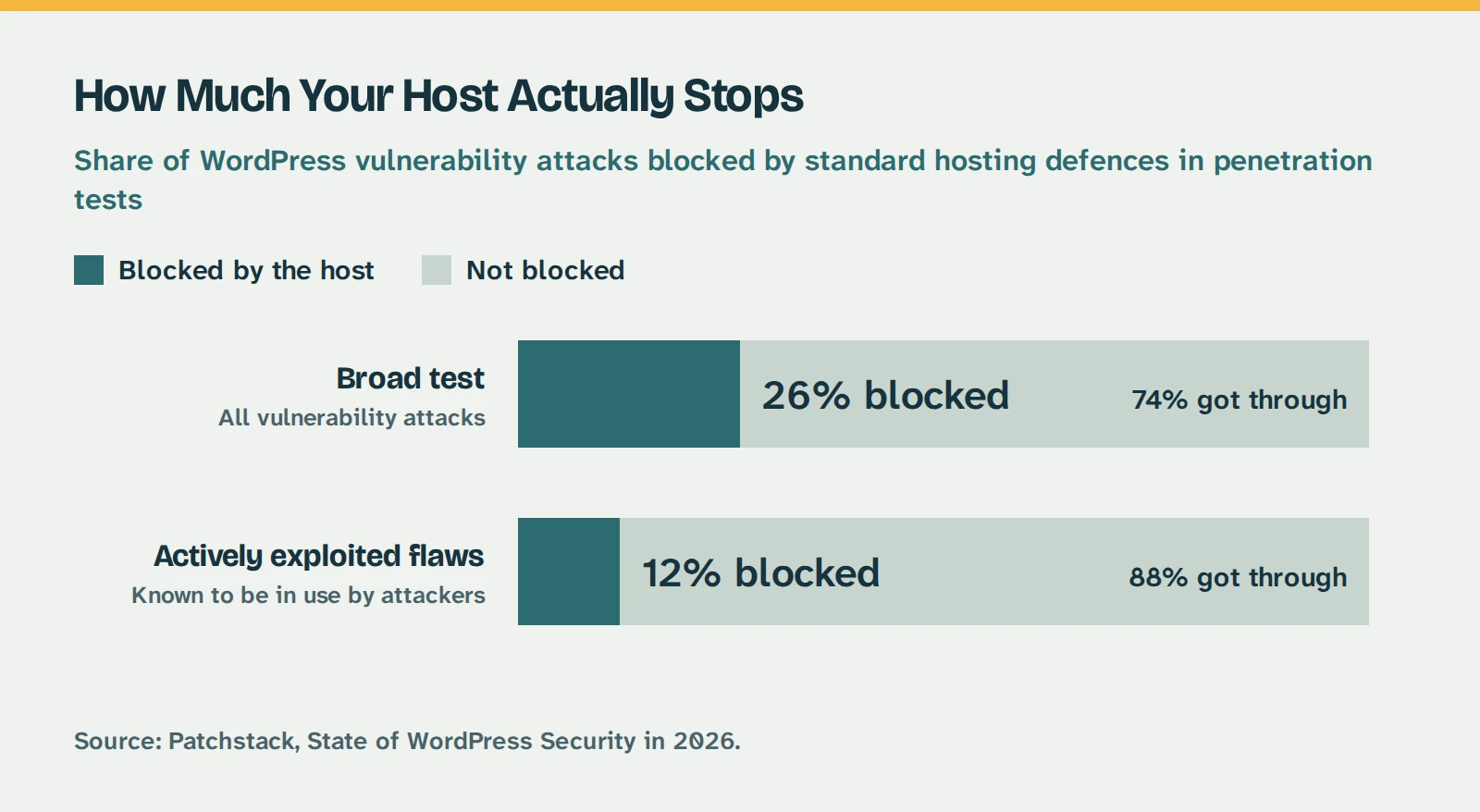
Patchstack, who track WordPress vulnerabilities for a living, ran penetration tests against popular hosting companies to see how much their security actually stopped. In the broader study, only 26% of vulnerability attacks were blocked. In the narrower one, focused on flaws known to be actively exploited, standard defences stopped 12%.
Most hosts are honest about this if you read the small print.
How much your host actually stops: 26 per cent of attacks blocked in the broad test, 12 per cent for actively exploited flaws. Source: Patchstack, 2026.
I Will Just Update It Myself Every Month or Two
The window is five hours, not five weeks.
Patchstack measured the gap between a vulnerability becoming public and attackers using it at scale. The weighted median is five hours. Around half of high-impact vulnerabilities are being exploited within twenty-four.
Monthly updates are not slow. They are aimed at a completely different timescale to the one attackers are working on.
Surely Keeping It Updated Is Enough?
Sometimes there is nothing to update to.
Last year 46% of vulnerabilities had no fix available from the developer by the time the problem went public. What you need is somebody who knows what is installed on your site, sees the disclosure, and either deploys a protection rule or takes the plugin out of service until there is a patch. That only happens if somebody is watching.
I Would Know If My Site Had Been Hacked
It is specifically designed so that you do not.
The most common malware families use a technique called cloaking, where the site serves different content depending on who is asking:
- Google’s crawler gets pages stuffed with spam keywords
- Your customers get redirected to a phishing page or a fake shop
- You, and any scanner you point at it, get a perfectly clean website
Some of it is worse. There is a family that runs in the server’s memory and rewrites your core files the moment they are restored, so it survives being cleaned.
The way most people find out is a customer ringing to ask why the site sent them somewhere strange, or their Google traffic quietly falling off a cliff over six weeks.
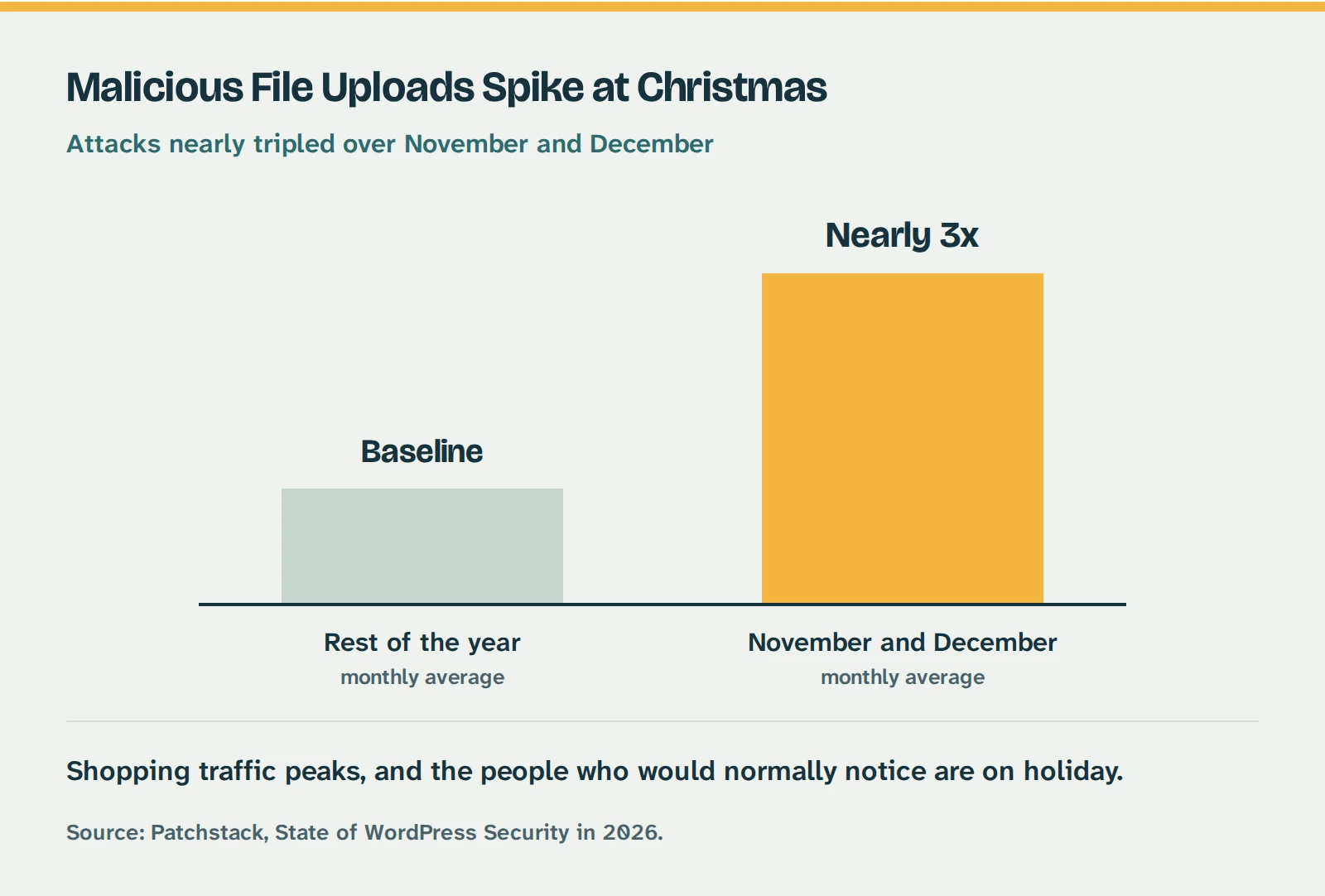
And there is a season for it. Malicious file uploads nearly tripled across November and December last year, because that is when shopping traffic peaks and the people who would normally notice something is wrong are on holiday.
Malicious file uploads nearly tripled over November and December compared with the rest of the year. Source: Patchstack, 2026.
What It Costs When It Does Go Wrong
The invoice is the smaller half.
What you will pay for: emergency work at short notice, somewhere between £50 and £150 an hour. Working out what the infection touched and whether it reached your database. Whether anything needs reporting.
What nobody quotes for: days of your week, gone. Explaining to customers why your site sent them to a phishing page. Waiting on Google to lift a warning. Rebuilding rankings that took two years to earn.
For a small business, a fortnight of that is a genuinely bad month.
The point of the £35 is not that it makes a compromise impossible. Nothing does. The point is that when something happens, you send me a message and it is my Tuesday that gets ruined instead of yours.
If You Would Rather Do It Yourself
Some people should, and I would rather say so than pretend otherwise. Here is the actual job:
- Weekly core, theme and plugin updates, applied to a copy of the site first so a bad one does not take the live version down
- Backups you have tested by actually restoring one, rather than assuming they work
- Watching a vulnerability database for the specific plugins you run, because sometimes the right move is disabling something rather than updating it
- Checking your contact forms still send after every round of updates, because that is the thing that breaks silently and costs you enquiries for a month before anyone notices
If you are comfortable with all that, do it. It costs time rather than money and there is nothing mystical about it.
The bit to be honest with yourself about is not the routine weeks. It is the Friday evening when an update takes the site down and you are the only person who can fix it.
The One Thing I Would Never Do: Leave WordPress Unattended
I would not run a WordPress site with nobody looking after it.
If the monthly cost is the sticking point, the answer is not an unmaintained WordPress site. It is a different platform. Squarespace or Wix will patch the software for you because that is what you are paying them for, and for a simple site that never changes, that is a perfectly sensible choice. I will tell you if it is the right answer for you.
What I would avoid is the middle ground, where there is a WordPress site running under your business name that nobody has touched in three years. That site is not sitting there harmlessly. It will eventually get found by a scanner, and there is a decent chance you will not know for months.
If you have genuinely got a site that does not matter enough to look after, take it offline. That is a better outcome than leaving it up.
Six Questions Worth Asking Anyone, Including Me
- Do you test updates somewhere before they go on my live site?
- How often do you back up, and where is the backup stored?
- If an update breaks something, is fixing it included or extra?
- How do I contact you, and who actually replies?
- Do I own my site and my domain, and what happens if I leave?
- What is not included, and what would you charge for it?
That last one is the most useful, and the one most likely to be met with waffle. My answers to all six are on the hosting and maintenance page, in writing, so you can hold me to them.
The Bit Where I Tell You What I Cannot Do
There is one of me. There is no overnight rota. If something breaks at two in the morning on Boxing Day, it stays broken until I see it. And as I said above, late December is exactly when attacks spike, because attackers know full well that everyone is away.
What I do about it: monitoring that tells me rather than waiting for you to notice, and two backups a day so recovery is a restore rather than a rebuild. Most problems I know about before the client does.
But if you need a contractual response time with penalties attached, or somebody awake at 3am, you need an agency with a team and a rota. That is not me, and I would rather say so now than after you have signed up.
So What Are You Actually Buying?
Expertise, partly. Somebody who knows what is on your site and what to do when a plugin goes bad.
But mostly you are buying the thing off your list. No wondering whether that update matters. No Sunday evening working out why the contact form stopped sending. No emergency invoice from somebody who has never seen your site before.
You get on with running your business, and the website is somebody else’s problem. That is more or less what my clients say when you ask them what they are paying for.
That is the whole offer, and I think £35 a month is a fair price for it.
Not Sure What Is Happening on Your Site?
Send me the address and I will tell you what is running on it, when it was last updated, and whether anything needs doing. No charge, and no sales call unless you want one.
Get in Touch